The free WordPress donation plugin that runs on your own Stripe.
KindLumen – Free Stripe Donation Forms puts a free Stripe donation form on any WordPress page — as a Donate button, an embedded donation form, or a donation campaign with a goal and a live progress bar. Connect the plugin to your account, route donations through your own Stripe account, and keep card and donor data out of WordPress.
Free plugin · free KindLumen account · no setup, monthly, or platform fees.
KindLumen donation forms
WordPress setup status
Form connected
Your selected KindLumen form is ready to display.
Stripe is connected
Donations are open. Square or PayPal is named here when that is the verified provider.
Add the form to WordPress
Choose a button, inline form, campaign card, or full campaign page.
Free Stripe donation forms on WordPress in three steps.
The setup screen walks through account connection, payment readiness, and placement. It does not require copying form IDs or pasting Stripe keys into WordPress.
Connect the form
Click Connect with KindLumen, sign in — or create an account — and choose the form for this site. The connection fills in the organization and form identifiers.
Confirm payments are ready
The screen reports whether donations are open and names a verified Stripe, Square, or PayPal connection. If action is needed, it links to payment settings in KindLumen.
Put a Donate button on your site
One click creates a Donate page with the form on it. Or use the embed builder to get a shortcode or link for any page, post, menu, or page builder.
A button, a form, or a whole campaign — your choice per page.
Pick what to show and how in the plugin’s embed builder or in the block. Every option uses the form you connected.
Donate button
A button on any page that opens the embedded donation form over the current page.
Form on the page
Embed the whole donation form inline, sized to fit, for a dedicated Donate page.
Campaign card and page
Show a campaign’s goal, progress bar, and Donate button as a card, or embed the full campaign page.
Block editor
Add the KindLumen Donation Form block and pick what to show from a dropdown of your live forms and campaigns.
Menu button
Tick “Donate button” in Appearance → Menus and it appears pre-styled, opening the popup.
Donate links
Point any theme or page-builder button at #kindlumen-donate and it opens the donation popup.
Payment status in WordPress
The setup screen names a verified Stripe, Square, or PayPal connection and links to payment settings when action is needed.
Create a Donate page
One click adds a draft page with the form already on it. Publish when it looks right.
Floating Donate button
Switch it on in KindLumen and it appears on every page of your site — pinned to a corner or edge, opening the popup. Nothing to paste.
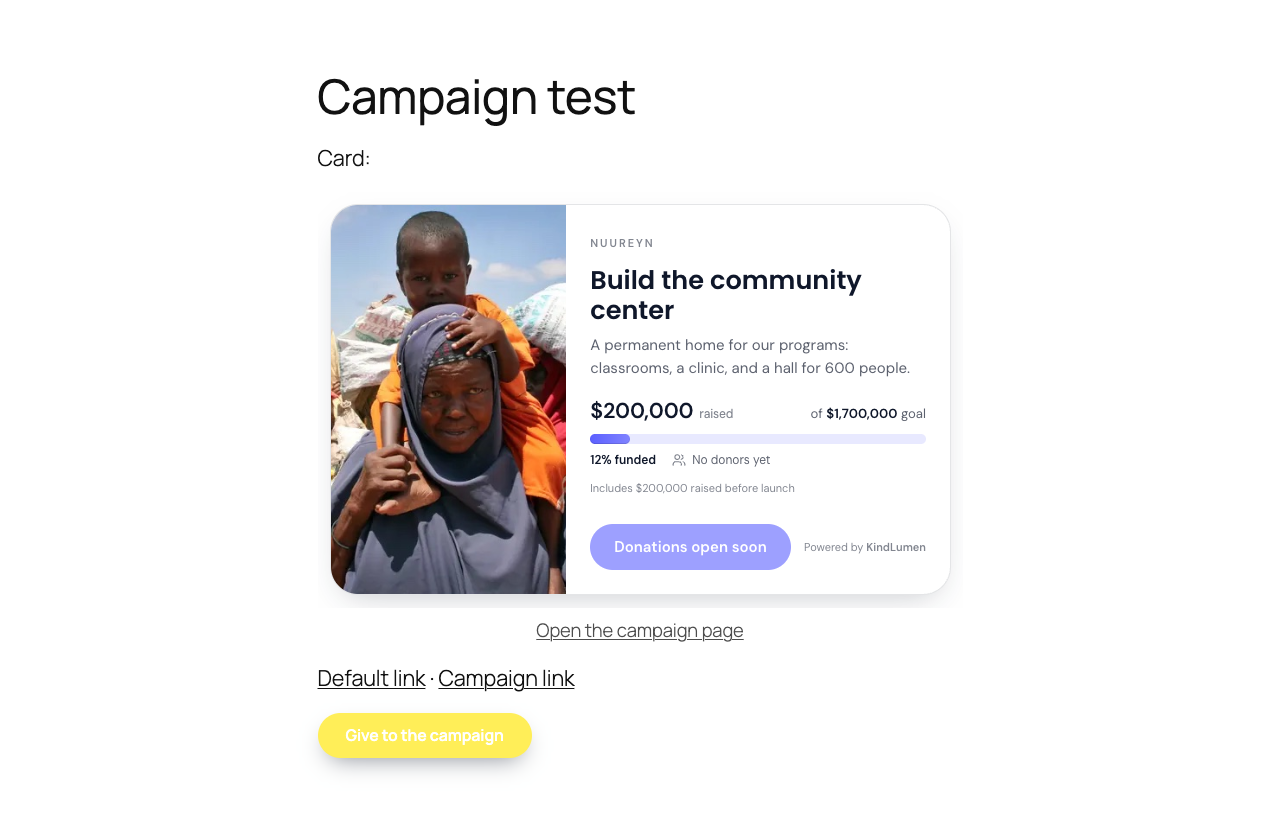
Donation campaigns with a goal and a live progress bar, right on your homepage.
Raising for a building, a program, or a season? Create a donation campaign in KindLumen with a goal, a story, and a picture — and what you’ve already raised — then drop its card on any WordPress page with [kindlumen_campaign]. The card shows the amount raised, the goal, and a Donate button that opens the campaign in a popup, and it updates live as recorded donations come in. Prefer the whole story on your site? Embed the full campaign page instead.
A native block, with your forms and campaigns in a dropdown.
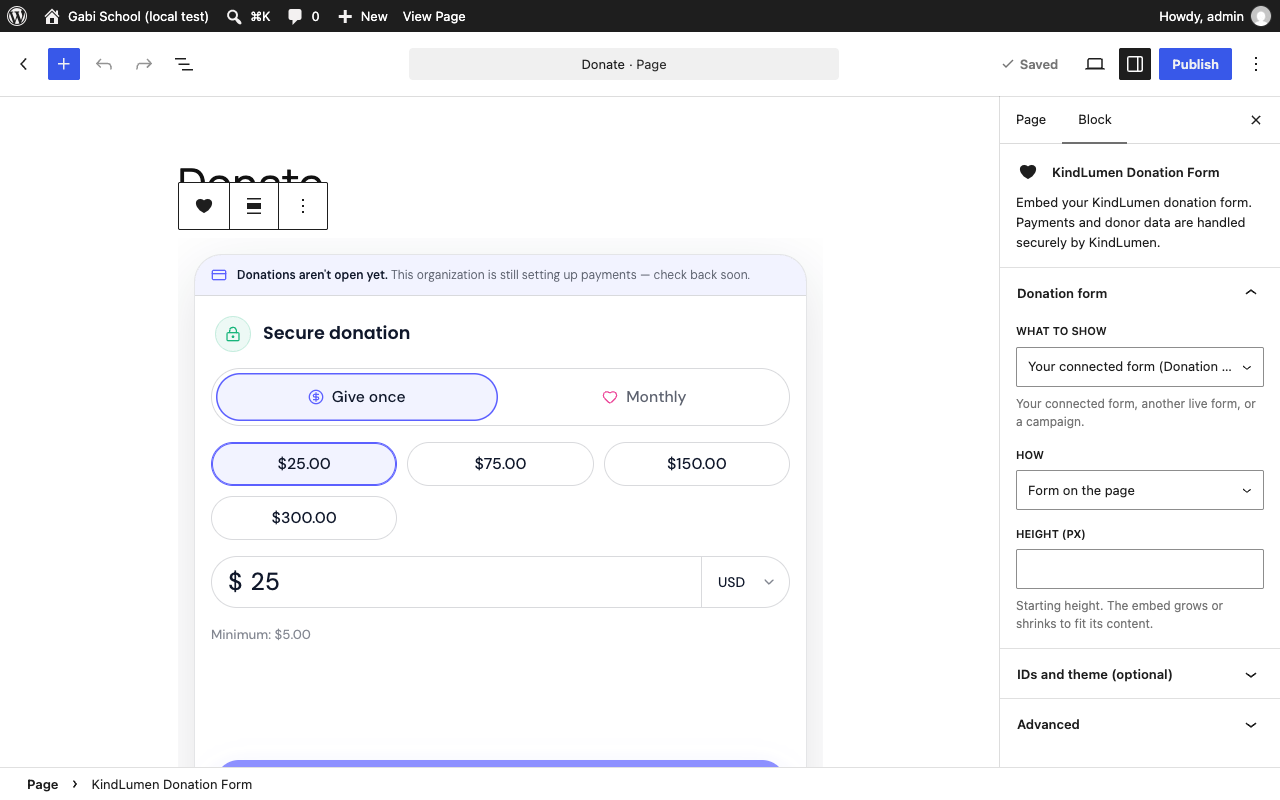
Add the KindLumen Donation Form block, choose what to show — your connected form, another live form, or a campaign — and how: a popup button, the form on the page, a campaign card, or the full campaign page. The editor previews the real form. Using the Classic Editor or a page builder? The same options come as shortcodes.
Light on your site, strict about data.
No card or donor data in WordPress
The form renders in a KindLumen iframe with the selected provider’s payment interface. Payment details and donor records are not submitted to or stored by WordPress.
Free, on your own payment account
The connected provider processes gifts for your organization’s own account. KindLumen never holds funds and charges organizations no setup, monthly, or platform fee.
Light and low-maintenance
The plugin is a presentation layer with no custom donor tables or WordPress payment processing. Updates arrive through the normal WordPress plugin workflow.
Both are free. Pick the one that fits.
The plugin and the copy-paste snippet render the same form from the same KindLumen account.
Use the plugin when…
- You’d rather click Connect than copy code.
- You want shortcodes, a block, and a menu button that just work.
- You’ll show campaigns with a progress bar.
- You want to check payment-provider status from WordPress.
Use the snippet when…
- You keep plugins to a minimum by policy.
- Your site is on WordPress.com or a host that limits plugins.
- You’re pasting the same two lines on several platforms.
- You just want a button on one page and nothing else.
WordPress plugin questions, answered.
Is the KindLumen WordPress plugin free?
Yes. KindLumen – Free Stripe Donation Forms is free on WordPress.org, and KindLumen charges organizations no setup, monthly, or platform fee. The selected payment provider’s processing fees still apply. Donors can optionally cover an estimated transaction cost; where the provider supports automatic collection, that added amount also includes a disclosed 1% contribution to KindLumen.
Do I need a Stripe account?
Not for every form. The plugin is Stripe-first, but version 1.1.3 can display a KindLumen form backed by a verified Stripe, Square, or PayPal connection. Checkout and payouts follow the provider selected for that form. A verified Stripe connection is currently required for monthly giving.
Does it support recurring or monthly donations?
Yes, when the form uses a verified Stripe connection. Turn on monthly giving in KindLumen and Stripe handles the subscription; Square- and PayPal-backed forms are currently one-time only. Suggested amounts, a custom amount, optional transaction-cost coverage, and eligible card-backed wallets are available on supported Stripe checkouts.
Do I need a KindLumen account?
Yes, and you can create one from the plugin itself. Click Connect with KindLumen on the setup screen, choose Create free account, and you are brought straight back to WordPress to pick your form.
Where do donations go?
To the organization’s own connected payment account. The plugin only displays the form; the selected provider handles the charge and payout under its agreement with the organization, while receipts and donor records live in the KindLumen dashboard.
Does the plugin store donor or card data in WordPress?
No. The plugin stores only display settings such as which form to show and the button label. Donor details stay within the embedded KindLumen form, and payment details are entered through the selected provider’s interface or hosted checkout. Neither is submitted to or stored by WordPress.
Does it work with Elementor, WPBakery, Divi, or the Classic Editor?
The shortcodes work wherever the editor or page builder executes WordPress shortcodes, including the Classic Editor. The block editor gets a native KindLumen Donation Form block, and a link to #kindlumen-donate can trigger the popup. Preview the published page because builder and security settings vary.
Can I run a donation campaign with a goal and a progress bar?
Yes. Create a donation campaign in KindLumen with a goal, a story, a picture, and optionally what you have already raised, publish it, then use the campaign card (amount raised, goal, progress bar, Donate button) or embed the full campaign page with the [kindlumen_campaign] shortcode or the block. The progress bar updates live as gifts come in.
Can I use KindLumen on WordPress without the plugin?
Yes. Every form also comes with a two-line embed snippet you can paste into a Custom HTML block. The plugin adds the guided account connection, shortcodes, the block, campaign cards, and payment-provider status inside WordPress.
What does the plugin load on my site?
It loads its front-end stylesheet and script, then renders the form in an iframe. The script is loaded asynchronously. As with any plugin, measure the published page with your theme, cache, consent tools, and other plugins enabled.
Accept donations on WordPress today.
Install the free plugin, click Connect, and put a Donate button on your site. Payments are handled through the verified provider connected to the selected form; monthly giving currently requires Stripe.
Website & Setup Guides
How to Accept Stripe Donations Without Writing Code
Stripe offers one genuinely zero-code donation route and several lower-code checkout routes. This guide separates them so you can choose without buying too much—or too little—technology.
By Kiran Patel
Website & Setup Guides
How to Add a Stripe Donation Form to WordPress With the KindLumen Plugin
The KindLumen plugin connects a WordPress site to a KindLumen form, then adds a button, inline form, or campaign card without storing card or donor data in WordPress.
By Devon Reed